shot_type: intelligent vs customize, When to Use Which
Kling 3.0 exposes two shot_type modes. Intelligent picks camera behavior for you. Customize hands the keys over. Here is when each is right, when intelligent smooths away the thing you wanted, and when customize turns three shots into nine.
Most teams pick one shot_type value on their second day with Kling 3.0 and never think about it again. That is a mistake. The two modes solve different problems, and the wrong pick costs you either creative control or shot budget. Here is when to use each, where intelligent over-smooths, where customize explodes shot count, and what the answers look like for ad spots, narrative content, and product turntables.
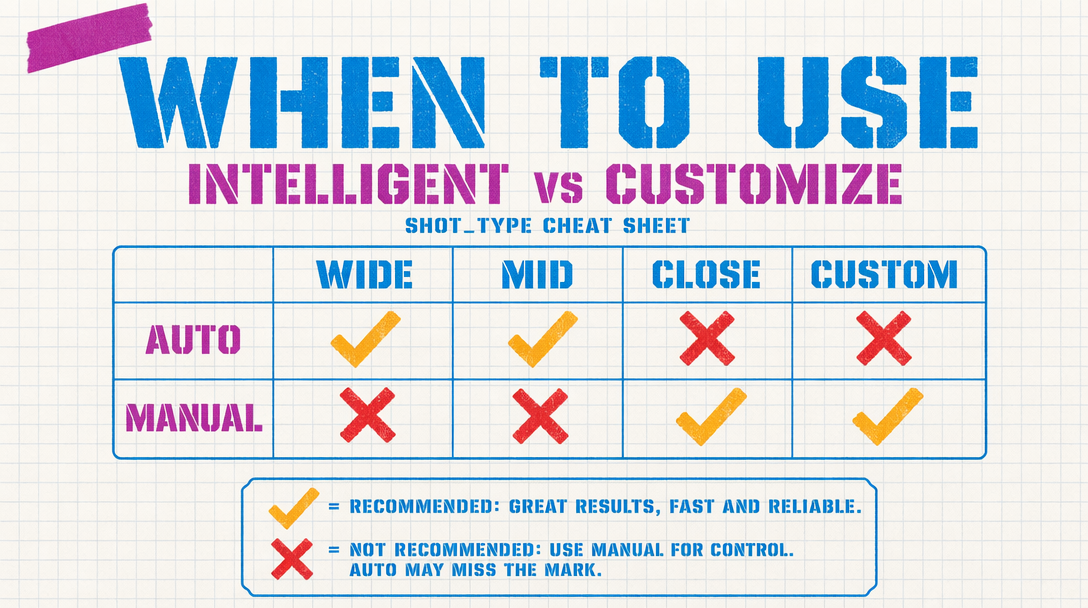
What the two modes do
With shot_type set to intelligent, Kling 3.0 reads your prompt, infers the camera and pacing it thinks the shot needs, and runs with that. You get a clean, well framed clip about 70 percent of the time. The other 30 percent, the model picks a camera behavior that is sensible but wrong for your edit.
With shot_type set to customize, you spell out the camera move in the prompt. "Slow dolly in, 40mm lens feel, subject centered, static tripod after the third second." The model does what you said. You also lose the automatic composition cleanup, which means your prompt has to carry more weight.
Where intelligent over-smooths
Intelligent wants the shot to feel good on first watch. Perfect for standalone social. A problem when the shot has to cut against another.
Shots ending on a hard beat. Intelligent eases the camera into a resting position and softens the final 12 frames. Beautiful for a single clip, terrible for a cut. If the edit needs motion to carry forward, intelligent eats the energy.
Shots with intentional imperfection. Slightly handheld, slightly under framed, the kind of thing that reads as documentary. Intelligent cleans that out.
Shots where you wanted the camera to do something counterintuitive. A slow push on an empty frame. A lock off on a moving subject. Intelligent reads these as mistakes and corrects them.
Where customize bloats shot count
Customize does exactly what you ask, which means when your prompt is vague about camera behavior, the render looks flat. The instinct is to split into smaller pieces, each more specific, and suddenly a 30 second sequence is 14 renders instead of four.
This happens most on narrative content with dialogue or voice over. Writers describe the scene in emotional terms, not camera terms. Customize does not translate "tender moment, close to her face" into a camera move. You rewrite the brief into a shot list.
Ad spots, narrative, turntables
Ad spots: default to intelligent, override on the opener, closer, and any product reveal. The reveal is the reason the ad exists. You do not want the model deciding the camera should pull away when you needed a push in.
Narrative that cuts together: customize almost always. The moment two shots need to match in camera language, intelligent becomes dangerous. It picks different behaviors for each because they describe different content, and the cut feels wrong. Write the shot list, use customize, render, cut.
Product turntables: intelligent wins. The model knows what a turntable looks like. It picks rotation speed, maintains framing, and eases the final frame. Customize here means spelling out the rotation, which gains nothing. For a perfectly cyclical loop, neither mode guarantees it. You render 10 seconds and loop in post.
The working code
1import { fal } from "@fal-ai/client";23fal.config({ credentials: process.env.FAL_KEY });45const opener = await fal.subscribe(6 "fal-ai/kling-video/v3/pro/text-to-video",7 {8 input: {9 prompt: "slow dolly in on a steaming espresso cup, 40mm lens feel, shallow depth of field, morning light",10 duration: 5,11 cfg_scale: 0.5,12 shot_type: "customize",13 aspect_ratio: "16:9"14 }15 }16);1718const transition = await fal.subscribe(19 "fal-ai/kling-video/v3/pro/text-to-video",20 {21 input: {22 prompt: "barista pulls the shot, steam rises, cafe ambient light",23 duration: 4,24 cfg_scale: 0.5,25 shot_type: "intelligent",26 aspect_ratio: "16:9"27 }28 }29);
The decision rule
Stands alone, use intelligent. Cuts with other shots, customize. Product reveal, customize. Product turntable, intelligent. If you cannot decide in 10 seconds, use intelligent and move on. A re-render at $0.56 for a 5 second Pro shot without audio is cheaper than the debate.